build log
Reachy Learner
I gave a desktop robot a narrow job: be a patient, local-first learning companion.
- Published
- September 3, 2026
- Filed under
- robotics, learning, build-log
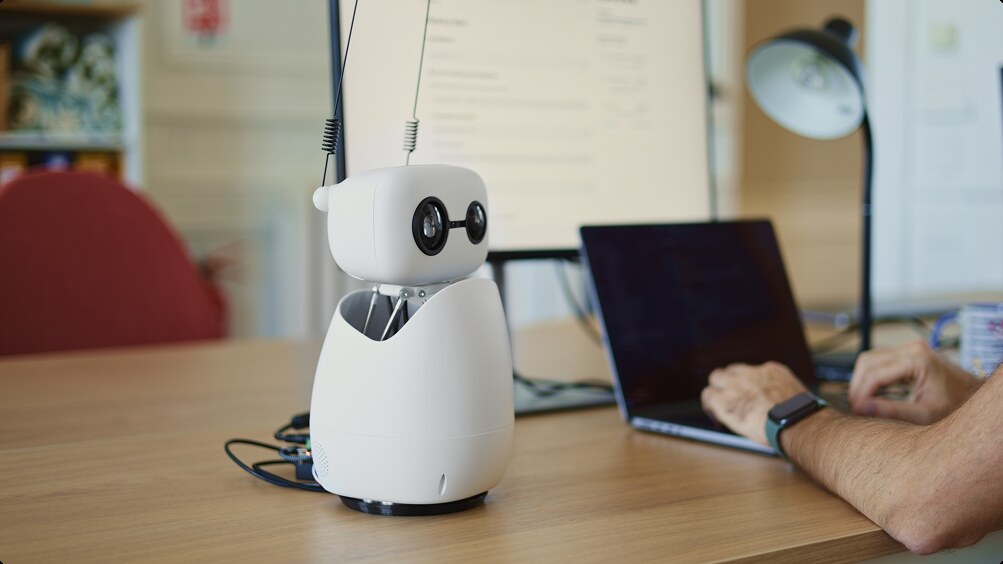
Reachy Mini. Photo by Pollen Robotics, from the Reachy Mini announcement.
I bought a Reachy Mini Lite last year because I like making things with my hands. I like the point where hardware, software, and AI meet. Robotics is not something I get to work on in my day job, so it is the kind of thing I return to when I have room to experiment.
The trouble is that I do not have much room.
This blog is called Forty First Hour for a reason. I have a full-time job and a family. Free time exists, but it is scarce. Projects have to earn it.
I did some early Reachy experiments. I set it up with OpenClaw during that brief, chaotic moment when everyone was building things around it. I learned how Reachy worked, got a few small demos running, and had a good time. But none of those experiments stuck. They were fun for a couple of days, then Reachy went back to sitting on my desk powered off.
A few weeks ago, Pollen Robotics released Microduck. Naturally, I wanted one.
Someone close to me was less convinced. Given the collection of half-finished projects around the house, the answer was reasonable: no new robot until I finished the Reachy project and made progress on the others.
They had a point. I have other robots in various states of completion, including Pollen Robotics’ Amazing Hand and a couple of 3D-printed robot arms that are still waiting for their finished purpose.
So I gave Reachy a new requirement. It could not just be fun. It had to be meaningful and useful.
That is where Reachy Learner began.
A job that suits a robot
I have a young learner at home who is working on math, spelling, and ASL. The idea was simple: what if Reachy became a patient learning companion?
That gave the robot a narrow, useful job. Reachy asks an age-appropriate question, shows a helpful visual, listens for an answer, offers a hint when needed, and celebrates effort. The screen handles letters, numbers, pictures, maps, and ASL reference cards. Reachy handles the part a screen cannot: attention, timing, voice, and movement.
It also shaped a few early decisions. A language model should not decide whether a child got a math problem right, invent an ASL sign, update mastery scores, or tell the robot where to move. Those jobs belong to the application.
The lesson engine asks for named behaviors such as listening, thinking, encouraging, and celebrating. The robot layer decides what those behaviors physically mean and keeps motion within tested limits.
Build the lesson before the hardware
The robot, Raspberry Pi, and display hardware were not all ready at the start. That turned out to be helpful. We built the learning application digitally first, using a mock robot and Reachy’s simulation path.
I used a combination of Claude Opus 5 and GPT-5.6 for most of the build. Those were development tools, separate from the models used by Reachy during a lesson. Later, GPT-6 Astra became especially useful for the Blender modeling, enough that it changed how we approached the backpack design.
That meant we could work through the important parts before debugging cables, Wi-Fi, audio devices, and power budgets. The first version included a child-facing lesson view, a parent and developer console, deterministic questions and scoring, local progress tracking, speech presentation, and a display protocol that could later drive the ESP32.
The first vertical slice was intentionally small: start a session, ask a math question, show it, accept an answer, score it, react, save the result, and move to the next question. From there, we added phonics, spelling, ASL fingerspelling practice, mixed lessons, and geography.
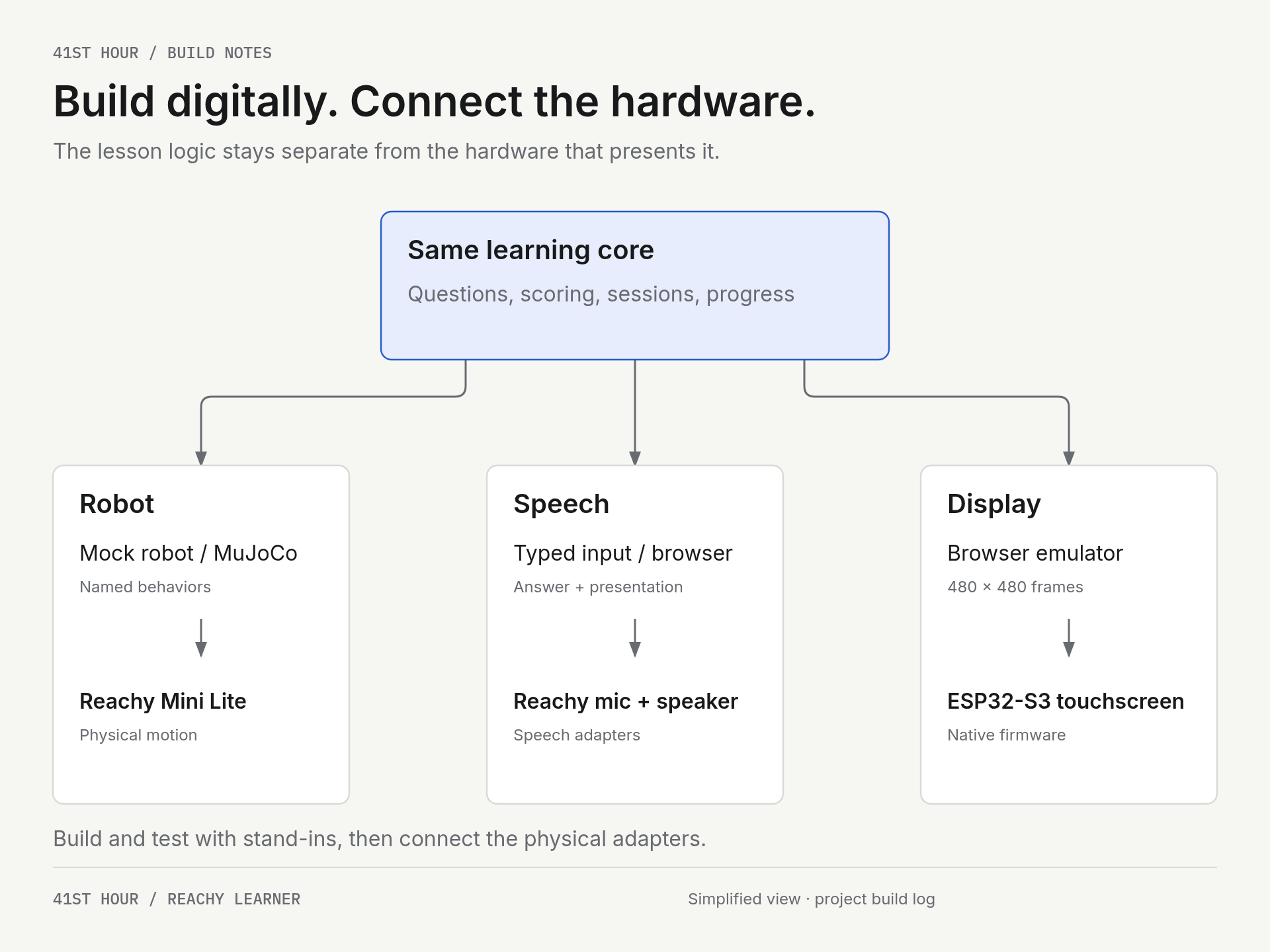
We could test questions, scoring, and progress before connecting the physical robot. Each hardware adapter implements the same role its digital stand-in used.
ASL has an important boundary. Reachy can teach and display fingerspelling reference cards, and a child can confirm they practiced a sign. It does not claim to judge whether a handshape was correct. Automatic sign recognition is a different project, and it would be dishonest to pretend otherwise.
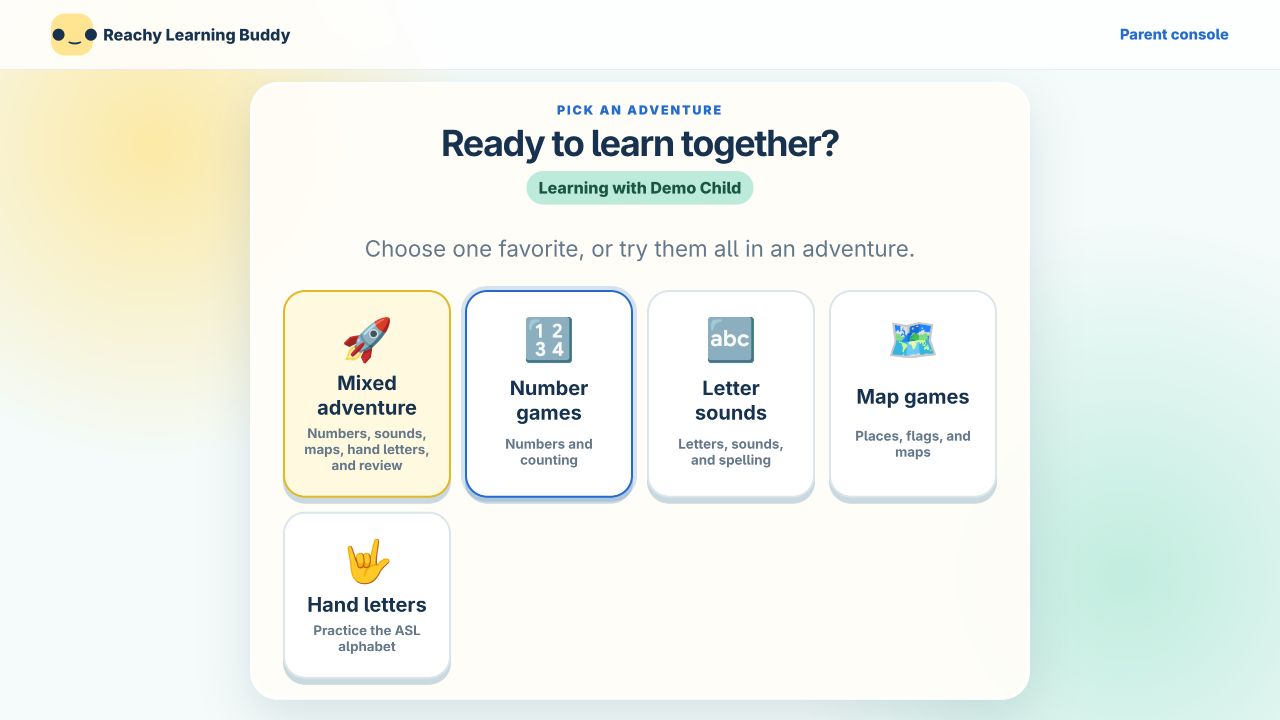
The child-facing app running in the browser. These screenshots use a separate demo database, not my child’s profile or learning history. They show the current application in hardware-free mode, not an archived screenshot of the first prototype.
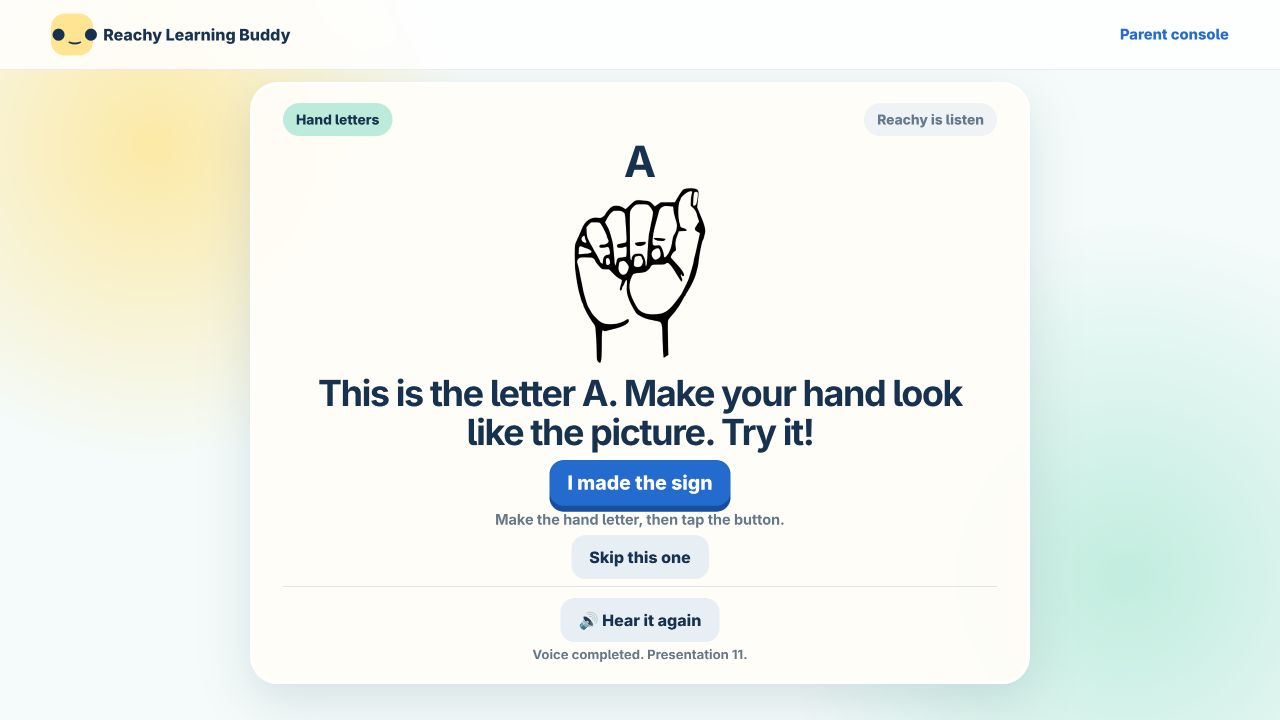
Hand-letter practice in the browser. The button records that the learner practiced; it does not verify the sign with a camera.
Bringing the hardware together
Once the application worked on a laptop, the hardware work could focus on integration rather than invention. The Lite in Reachy Mini Lite matters here: it relies on an external computer connected over USB. The wireless Reachy Mini has onboard compute; mine needs a separate host. Pollen Robotics’ platform overview covers that distinction.
For this build, that host is a Raspberry Pi 5. A laptop can do the job during development, but giving Reachy its own Pi means the learning companion can run without keeping my laptop attached. The Pi runs the learning application and local robot daemon, coordinating speech, learner data, the physical robot, and the display. We started with local speech recognition on the Hailo-8L and later switched the live voice experience to Meta’s Muse Voice Transcribe. That change deserves its own part of the story.
The ESP32-S3 touchscreen received its own printed enclosure. It is a native 480 by 480 display client, not a tiny browser. The Pi sends it the current lesson state, and it renders the question, visual, status, and available actions. Keeping the display separate from the lesson logic has made the whole system easier to reason about.
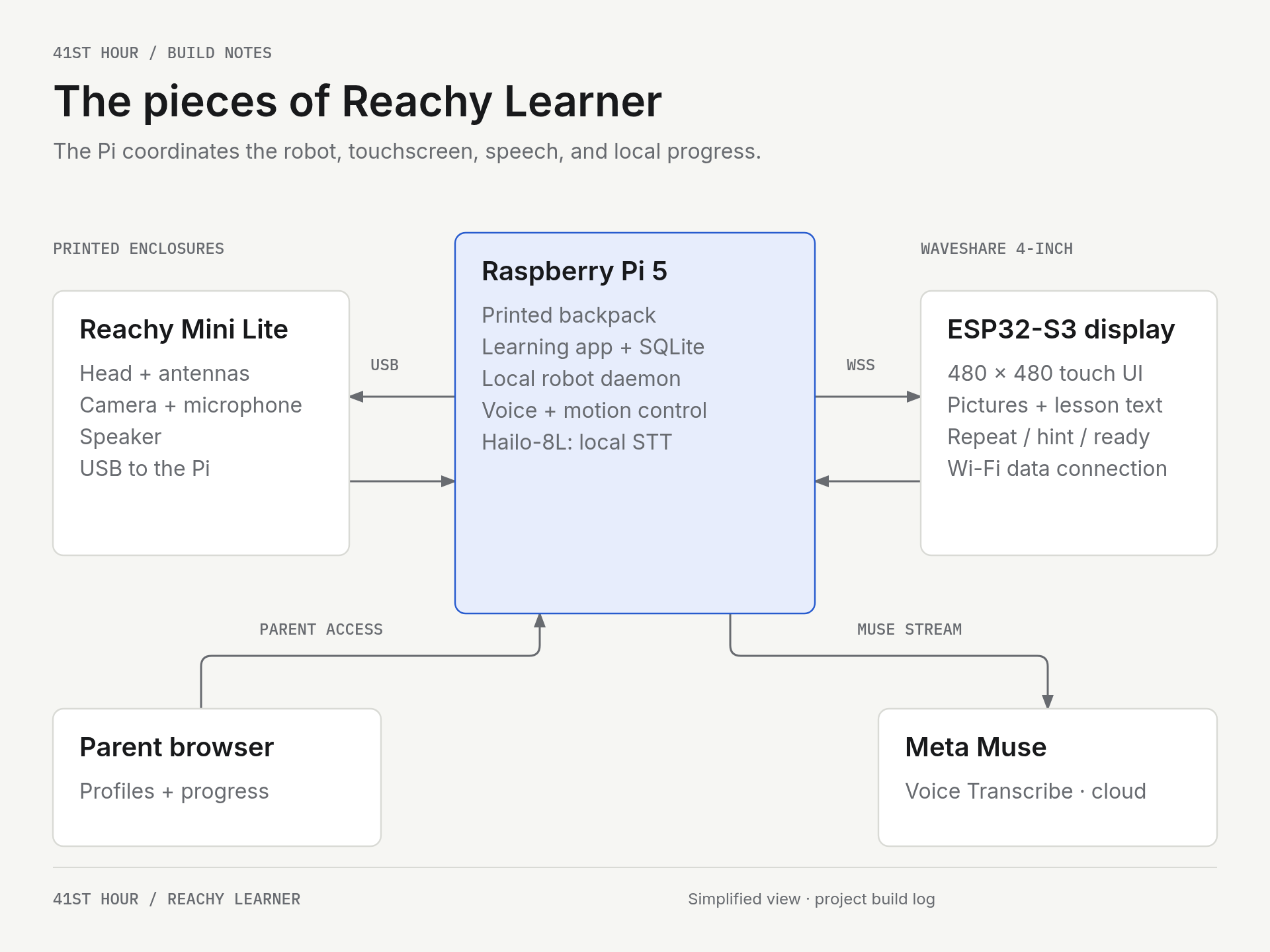
The Pi is the hub. Reachy handles movement, sound, and camera input; the ESP32 presents lesson visuals and touch controls. WSS means an encrypted WebSocket connection. This is a data-connection overview, not a power-wiring diagram.
Giving Reachy a dedicated computer also gave us a packaging problem. The Pi and its AI Kit needed somewhere to live. We modeled and 3D printed a custom backpack, with room for the board stack and access to its connectors.
We initially approached the modeling through Zoo MCP, a CAD-focused MCP tool. Once we started working with GPT-6 Astra, though, we abandoned that approach and gave Astra access to a local Blender installation to build the models. For this part of the project, that turned out to be a particularly useful combination. The backpack renderings below came out of that Blender work.
The design went through several iterations. An earlier version used a wraparound harness and a boxed enclosure. The later design uses two hooks over the rear body lip, a branching support for the electronics, and a removable leaf-shaped guard.
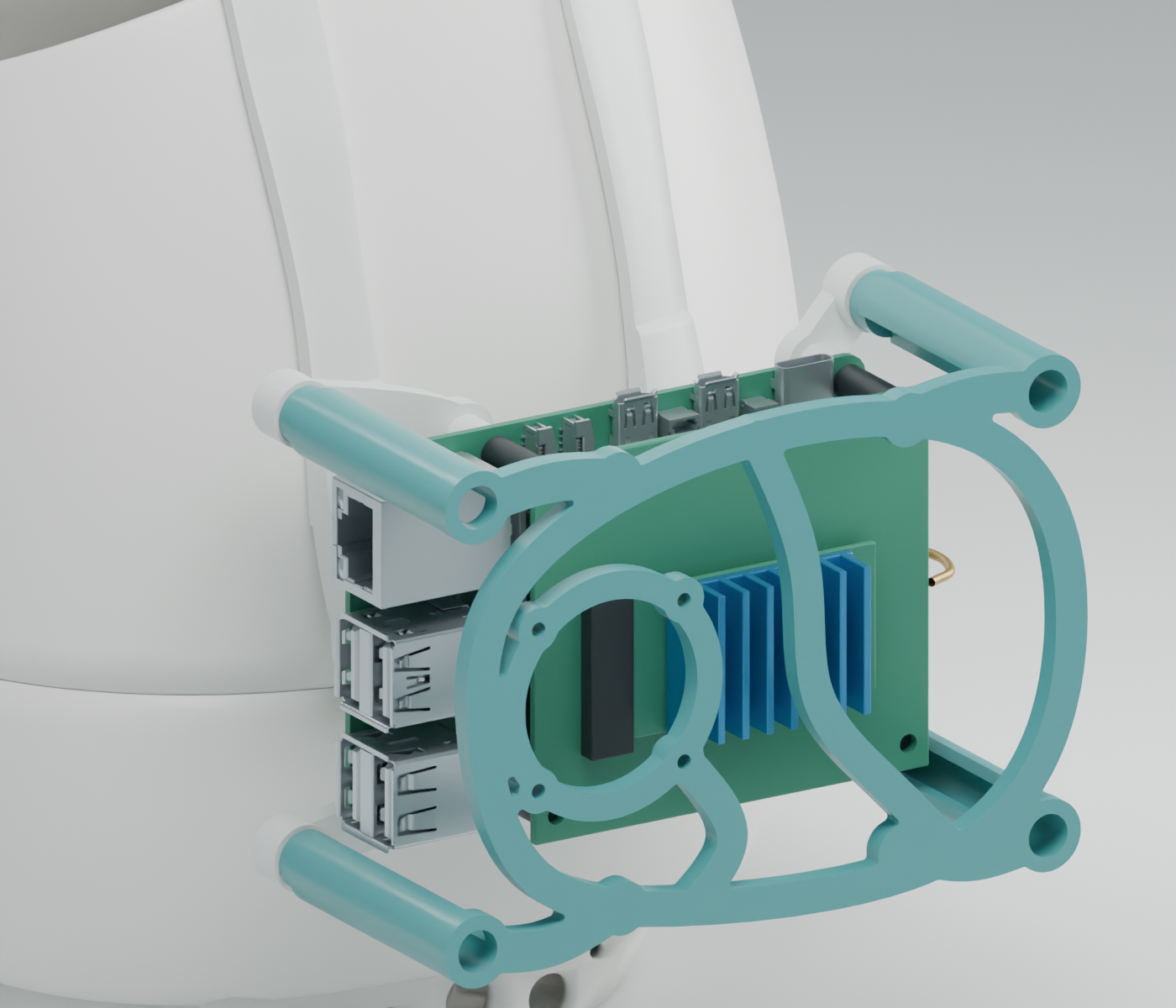
The V2 Blender assembly. The backpack carries the separate computer required by the Lite model. This is a model rendering; the latest guard’s physical fit, strength, full motion, and thermal performance still need validation.
The open shape leaves the boards and connectors accessible. The guard can come off for service, which matters when the software project inevitably sends me back to a cable or connector.
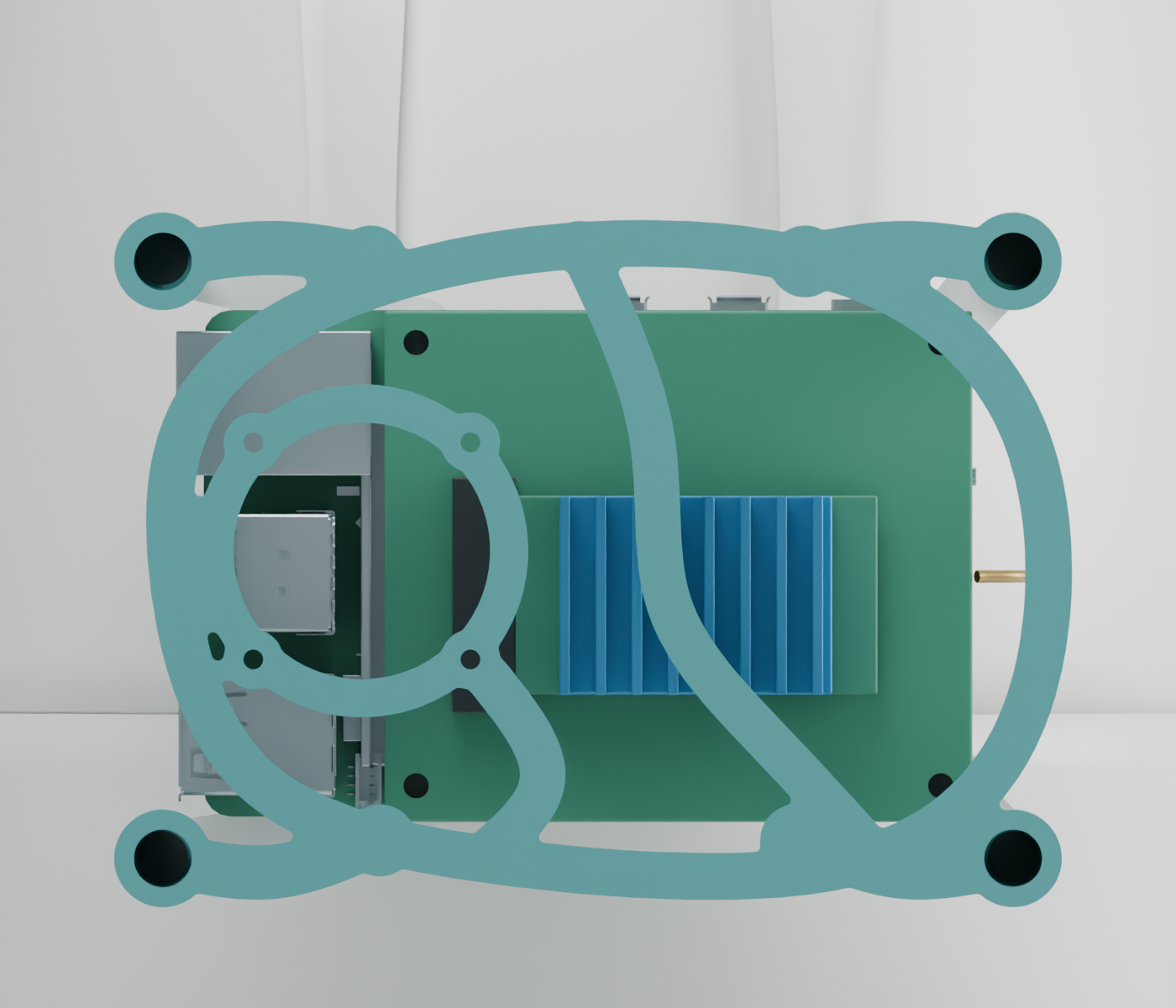
Rear view of the modeled backpack. The open guard leaves space around the electronics, while cooling and movement clearance still need to be checked on the actual assembly.
One revision came down to how the guard met the print bed. The earlier curved guard began on a few tiny contact points. We revised it to have a broad, flat face with ribs that rise from it, while preserving the existing screw alignment so the other printed parts could be reused.
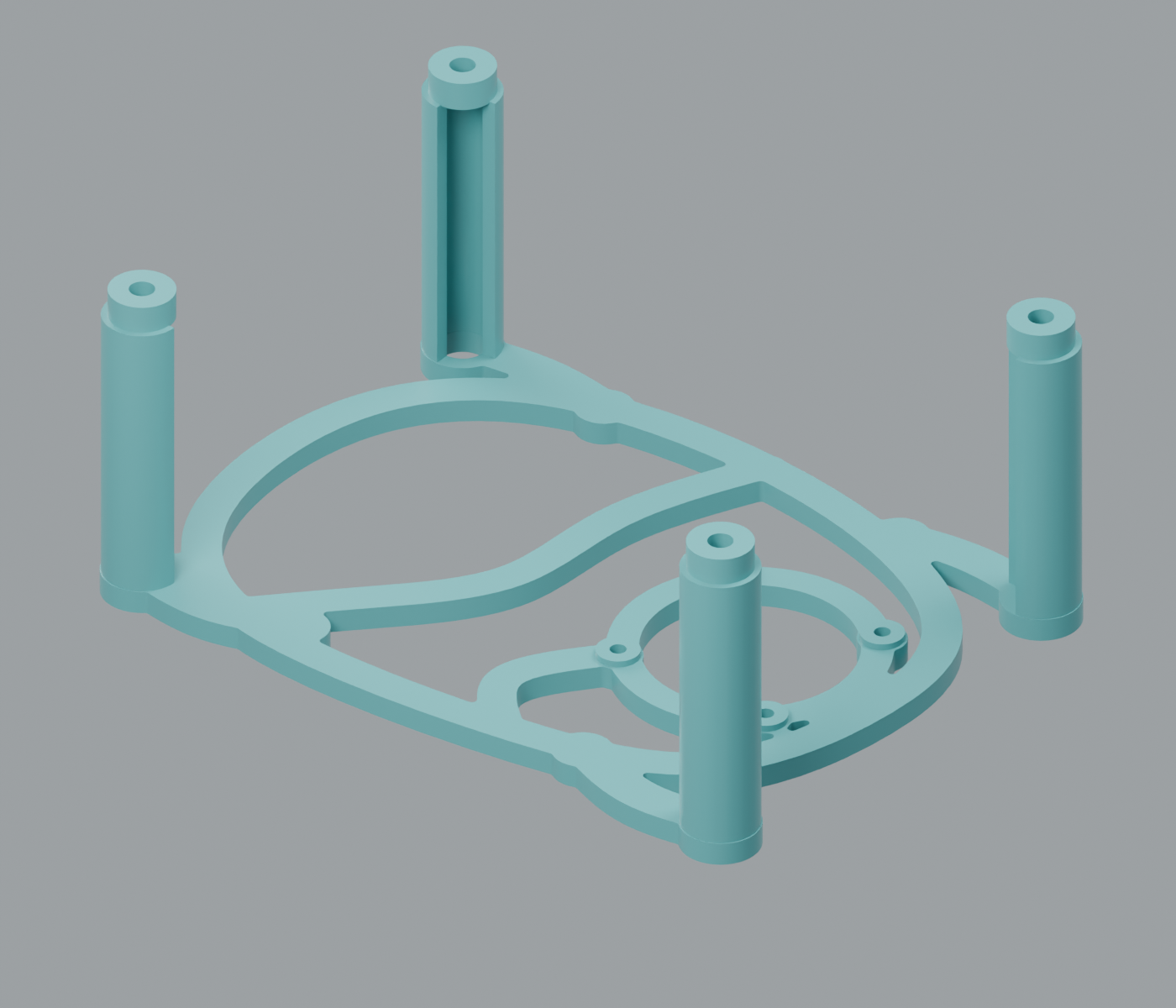
The revised guard in its intended print orientation. Designing the assembled shape and designing a part that prints well turned out to be separate jobs.
I printed the backpack and display enclosure on my modified Bambu P1P. That brought the project back to the part I enjoy most: taking something we had been working on in software and putting the physical pieces together.
The sixteen-second pause
Our first speech-to-text implementation ran locally. On the laptop we used whisper.cpp; on the Pi we got Whisper’s base model working through the Hailo-8L. Reachy recorded an answer, handed the audio file to the transcriber, and put the resulting text into the answer field.
It worked. It also took about sixteen seconds per turn in our initial Pi setup.
That is a long pause after answering a simple counting question. A robot can look thoughtful for a moment, but eventually you start wondering whether it heard you at all.
The integration notes pointed to startup overhead in the Hailo command-line path. Keeping a worker running between answers was one possible improvement. We had proved that local transcription could work; we had not yet made that implementation responsive enough for the experience I wanted.
Around the same time, Meta released Muse Voice Transcribe on September 1, 2026. Its streaming transcription and endpointing were a good match for the problem. Endpointing means recognizing when someone has finished speaking, so the application can move on without waiting for another button press.
We made the switch in stages. First, we built a speech gateway with a mock provider so we could test partial transcripts, completed answers, cancellation, and turn-taking. Then we connected Muse and streamed audio from the browser. A test phrase came back through the gateway as partial text, a speech-end event, and a final answer proposal in about two seconds. After that worked, we connected Reachy’s own microphone to the same path.
Those timings describe our early implementation and test runs, not a controlled comparison of the two models or a promise about every child’s answer. But they were enough to show why streaming was worth pursuing.
The tradeoff was explicit. Muse is a hosted service, so audio leaves the Pi during an active speech session. It needs an internet connection and brings API usage costs. We kept the local Hailo transcription path selectable for offline use; switching back is a configuration choice, not an automatic failover we have already built.
Getting the transcript faster also exposed the next problem. I still had to press a button to make Reachy listen. And a young child should be able to say “hmm, umm, I think it’s five” without having to learn the exact format our answer field expects.
We added automatic listening after Reachy finishes a question, with speech and microphone capture taking turns. We also added an answer interpreter: ordinary rules handle number words, filler phrases, spelled letters, and corrections. Only the cases those rules cannot confidently interpret go to Muse Spark, a separate model call from Muse Voice Transcribe.
That distinction matters. Voice Transcribe supplies the transcript. The interpreter extracts the proposed answer without seeing the expected answer. The curriculum’s deterministic scorer still decides whether the answer is correct. Voice mode echoes a confident candidate before submitting it, or asks for a yes/no confirmation when confidence is lower.
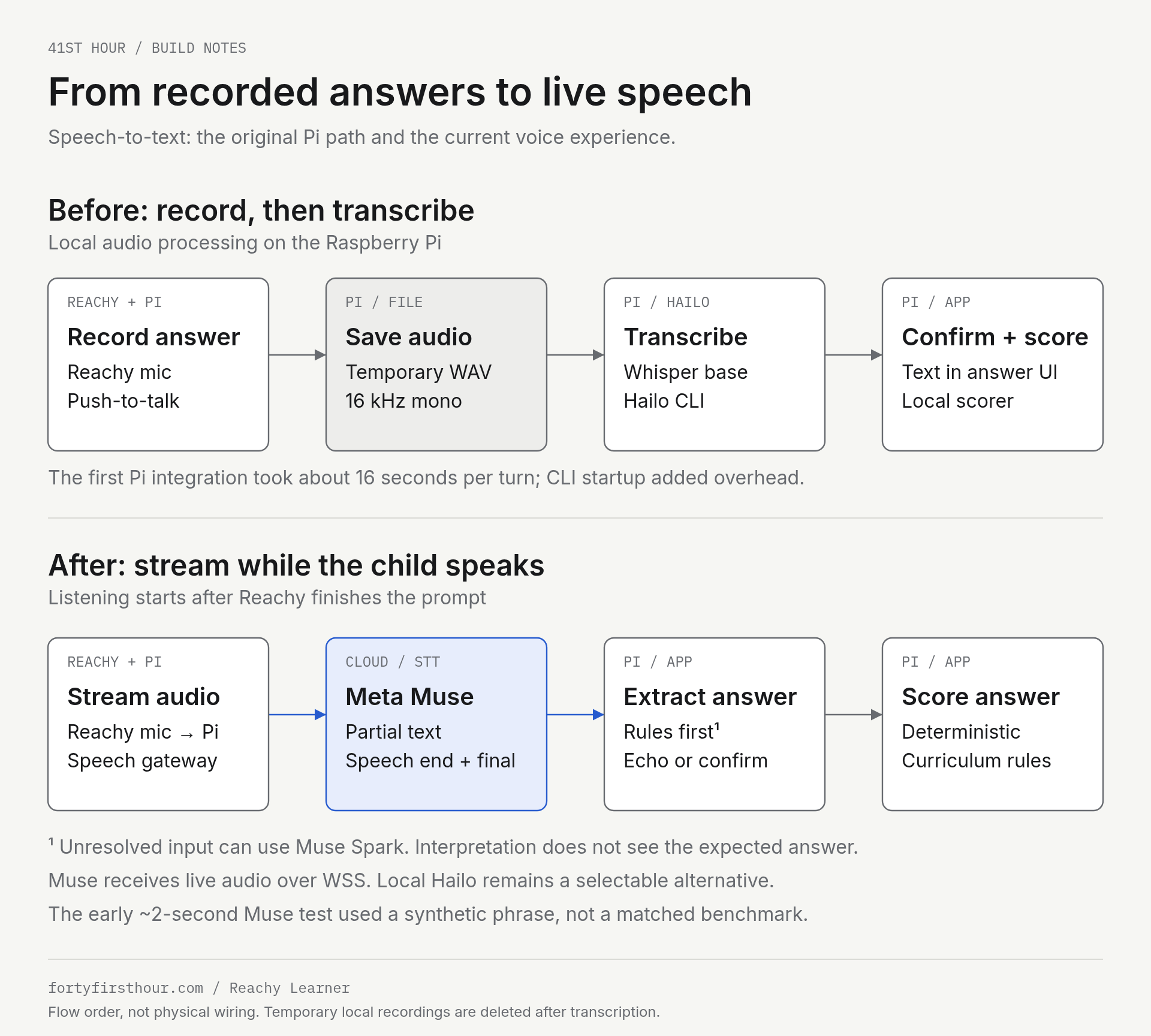
The change was from recording a complete answer before transcription to processing a live stream. The diagram also includes the later voice-first improvements. The timings are development observations, not a matched benchmark.
I was also impressed by how Muse handled speech with more than one voice involved. That is different from having reliable speaker labels in our application, though. We tried explicit speaker labeling, hoping to distinguish a parent’s prompt from a child’s answer. Our short two-speaker trials did not return the labels and final result we needed, so we stayed with endpointing. That part remains an experiment.
Giving Reachy a voice
Listening was only half of the conversation. We also spent time on how Reachy sounded.
The digital prototype used browser speech. When we moved speech onto the physical robot, Piper ran locally on the Pi, generating audio for each prompt and response. GStreamer and PipeWire handled playback through Reachy’s USB audio device. That gave us a working offline voice, but I wanted to explore other voices for a robot that would spend its time asking questions and offering encouragement.
We added a voice-preview panel to the parent console so we could compare voices using the same six sentences. We tried several ElevenLabs voices and settled on Jessica for the build, with a slightly slower speaking rate.
The predictable curriculum made the next step practical. We could enumerate its spoken sentences and generate the voice clips ahead of time. We used the ElevenLabs text-to-speech API for that preparation, rather than making a new speech request during every lesson turn.
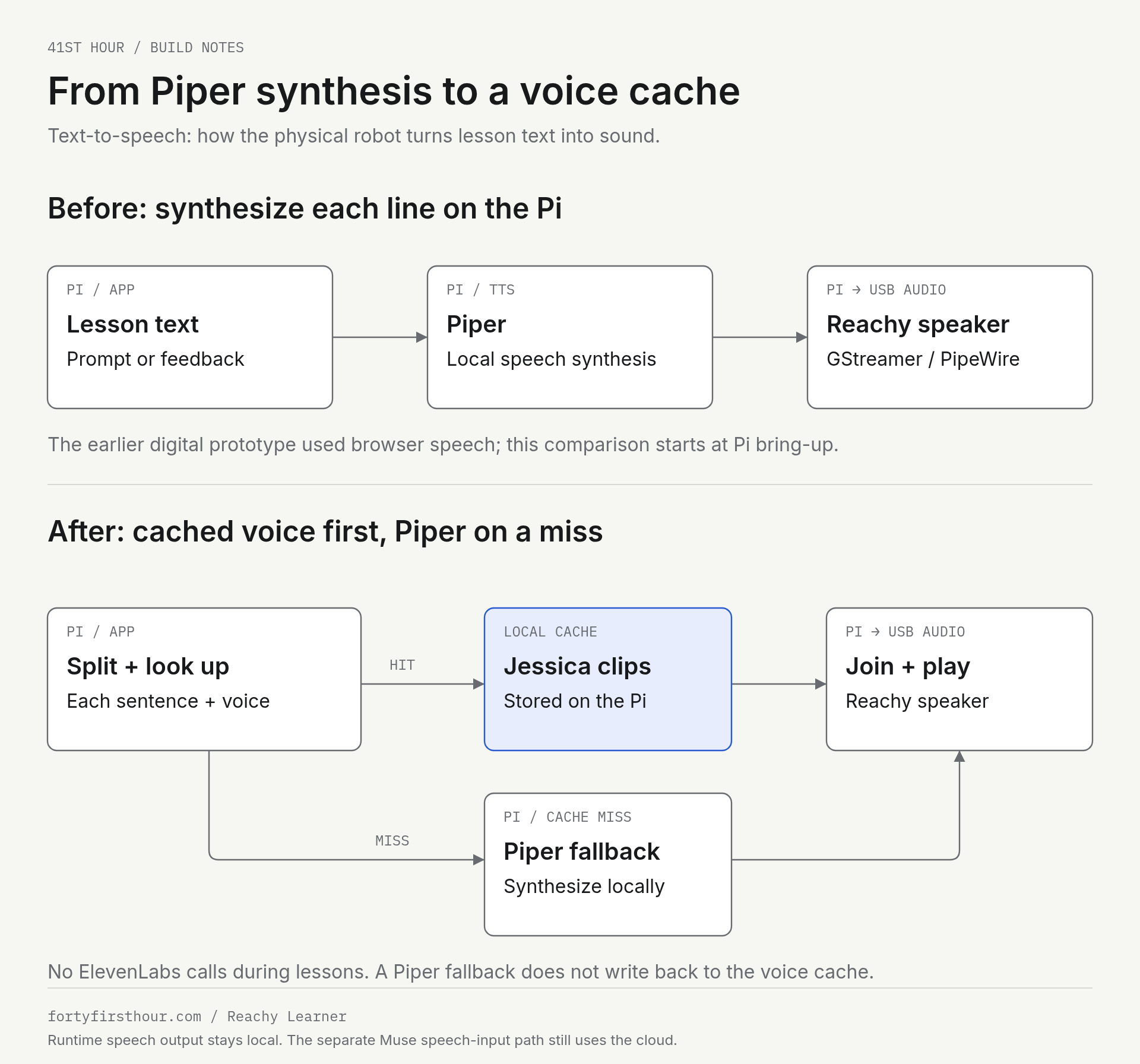
Piper stayed in the system. It now supplies sentences missing from the selected voice cache. A single response can contain both cached and locally synthesized sentences.
The setup became a small build-and-deploy routine:
- Enumerate the curriculum’s prompts, hints, feedback, and other spoken lines. Use preview-only generation to audition a voice before building the full set.
- Run the voice-cache builder on the laptop. Our setup uses ElevenLabs’ Multilingual v2 model, Jessica, and a speed setting of 0.9. The API key stays on the build machine and out of the repository.
- Save each generated sentence as a 22.05 kHz mono PCM clip, with an index linking the text and selected voice to its audio file.
- Copy the voice-cache directory to the Pi, configure its cache root and active voice, then check playback and cache coverage in the parent console.
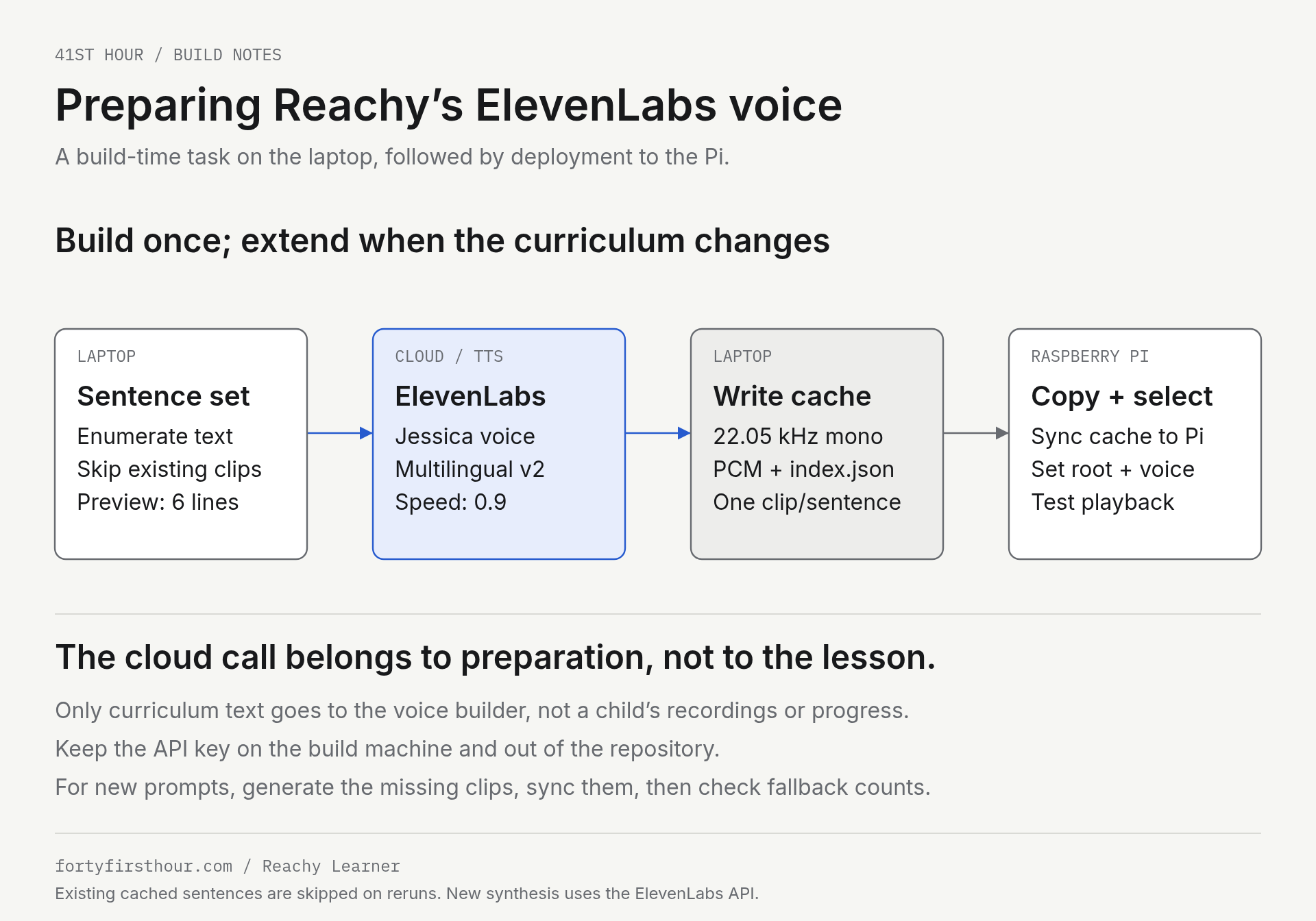
ElevenLabs is involved when we build or extend the cache. The builder skips sentences already cached, so adding lessons does not require regenerating every existing clip.
During a lesson, the Pi splits the spoken text into sentences and looks up each clip. A missing sentence goes to local Piper synthesis. The resulting audio is joined with short pauses and played through Reachy, under the same turn-taking rules that prevent speech and microphone capture from competing.
This is a different cloud boundary from Muse. The voice builder sends curriculum text to ElevenLabs, not a child’s recordings or learning history. TTS playback needs no ElevenLabs call during the lesson. Muse still receives live microphone audio when streaming speech recognition is enabled, so the whole voice experience is not offline.
There is a maintenance cost to this choice. New or revised lines need new clips, and a fallback sentence can sound different from Jessica. Piper keeps the response audible, but it does not automatically add its output to the cache. As the curriculum grows, we need to generate the missing clips, copy them over, and watch the fallback counts.
Making Reachy feel present
A robot can be technically correct and still feel absent. Reachy needed more than spoken prompts and an occasional nod.
We added face tracking during lessons so it can stay oriented toward the learner. We added small idle motions for the quiet moments: a gentle breath, an antenna flick, a brief glance around the room. We also integrated reviewed Reachy emotes and dances for questions, correct answers, hints, transitions, breaks, and celebrations.
The timing matters. A movement cannot fight with speech or interrupt a listening turn. A celebration cannot run so long that it makes the lesson drag. We built coordination rules around motion and audio so the newest lesson event takes priority and the robot can return to the task at hand.
The result is deliberately restrained. Reachy does not perform constantly. It reacts.
For my young learner, those reactions made a difference. Questions on their own became boring. Reachy’s native emotes and dances, along with the sound cues we added, helped keep the learning fun and gave my child a reason to stay engaged.
What a lesson looks like
A typical Reachy Learner session now works like this:
- A child chooses a lesson or starts a mixed adventure.
- Reachy speaks the prompt and the display mirrors it with a useful visual.
- The child answers by voice or typing. In tap mode, a voice answer waits for confirmation on screen. Voice mode echoes a confident answer before submitting it, or asks for a yes/no confirmation when confidence is lower.
- Reachy responds with encouragement, a hint, or a celebration.
- The application records the attempt and updates local mastery data.
- The next question arrives, with planned breaks in mixed sessions.
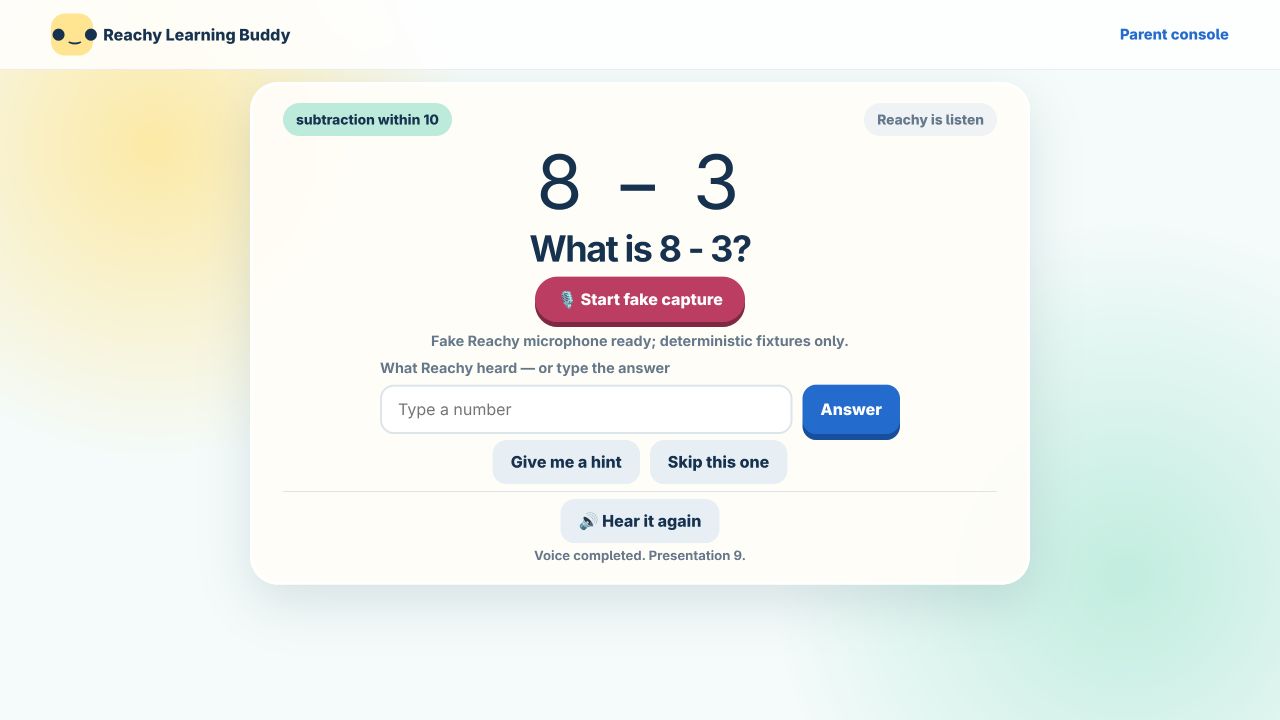
A number game in the hardware-free demo. The “fake capture” control belongs to the simulated microphone adapter; this capture is not a live Muse or physical Reachy audio session.
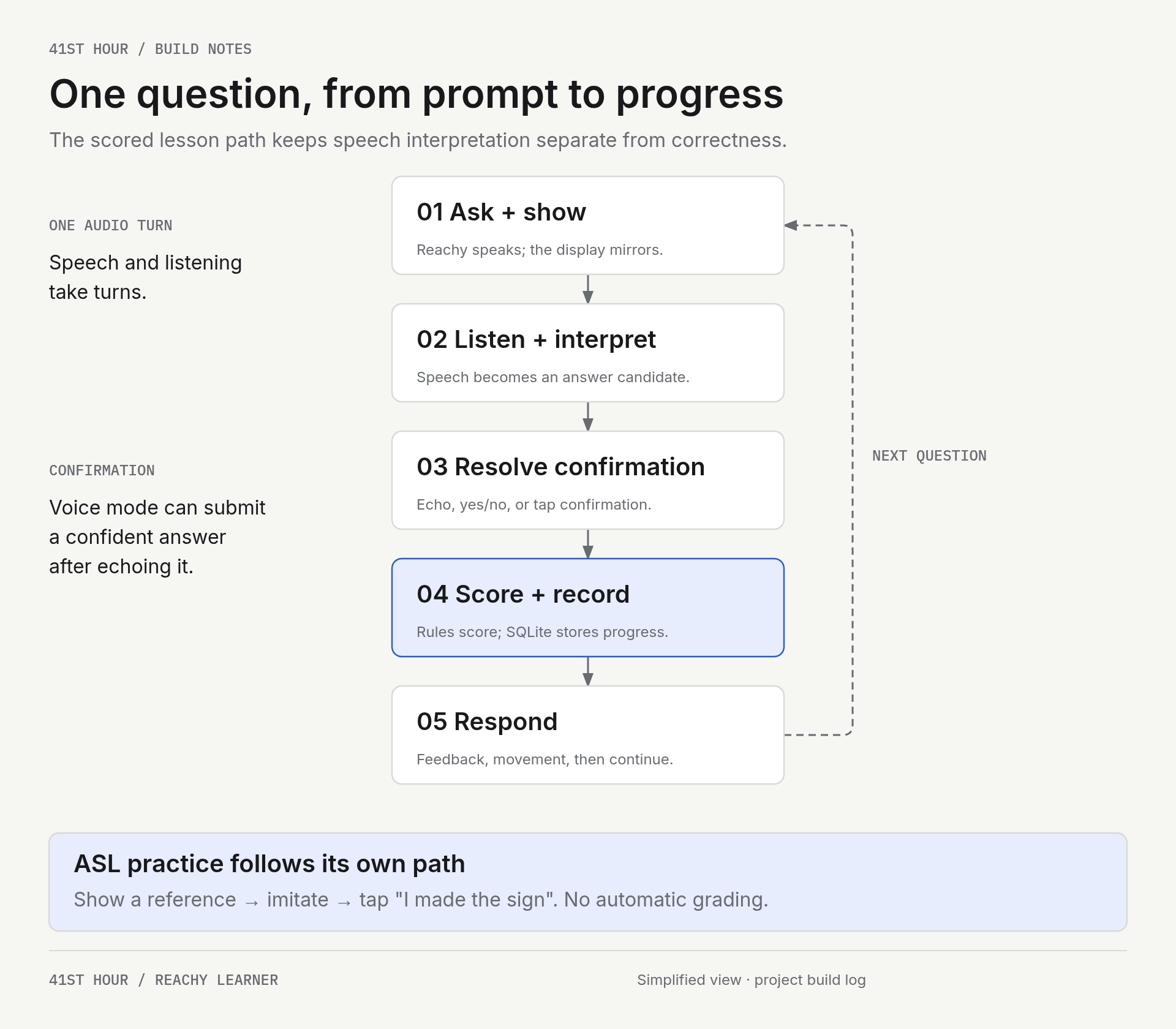
Interpreting what was said and deciding whether it was correct are separate steps. ASL practice stays outside this scoring loop.
The system is designed to degrade gracefully. A display disconnect should not end a lesson. A hardware problem should be visible in diagnostics, but it should not turn a learning session into a debugging session.
The parent app gives me a different view of the same activity: which lessons ran, what was scored, and which ASL letters were practiced. Keeping those records separate makes it clear what the application actually measured.
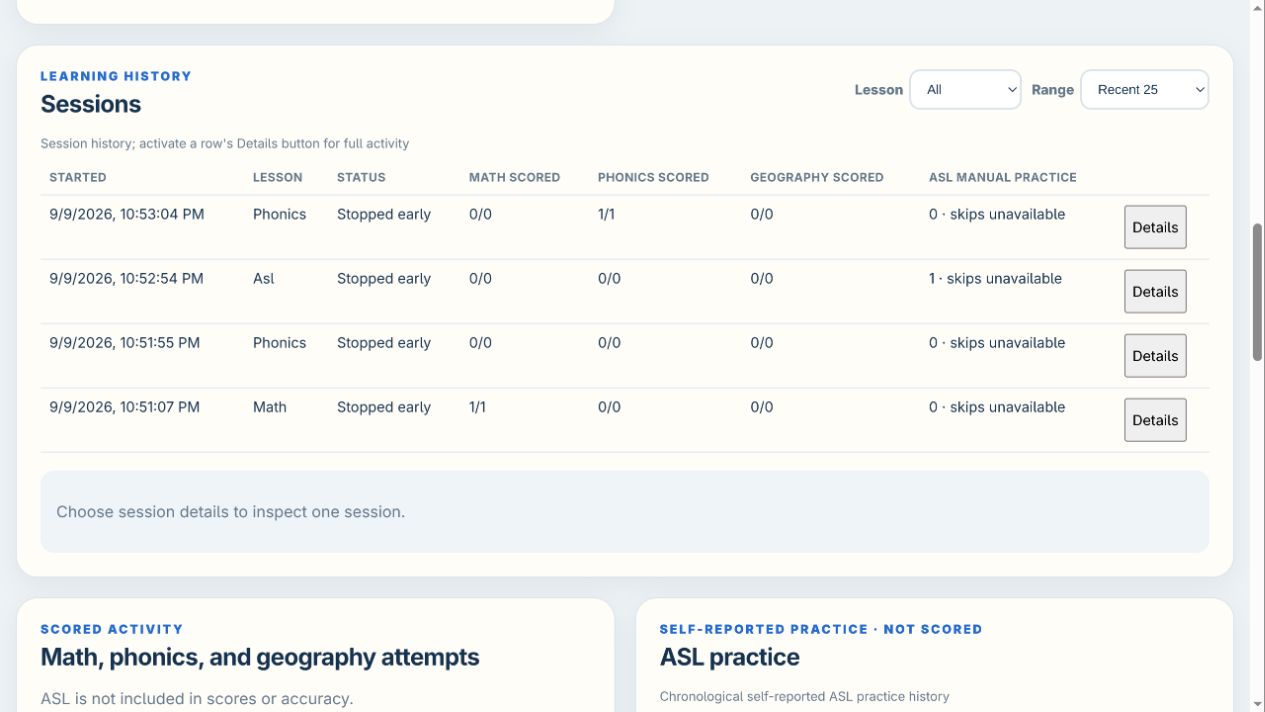
The parent portal with sample sessions created for this post. I stopped these short demonstrations after their example activities, which is why the history says “Stopped early.” The scores and timestamps are demo records, not evidence of a child’s learning progress.
What version 1.0.0 means
Version 1.0.0 does not mean finished. It means the project crossed the line from an interesting experiment to a coherent system.
Reachy Learner now has a working learning application, several subject areas, local learner progress, voice-first interaction, a physical Reachy Mini Lite integration, a Raspberry Pi deployment, a native ESP32 touchscreen client, custom 3D-printed enclosures, and a robot with enough movement and personality to feel engaged.
The useful part is not any one of those pieces. It is that they now work together.
What comes next
The next phase is less about adding features at any cost and more about living with the system.
I want to keep improving the physical build: cable management, cooling, serviceability, and the small details that matter after a few months of use. I also want to keep watching power and USB stability. A Pi, a display, a camera, and robot audio hardware make a surprisingly demanding little stack.
On the software side, likely next steps include improving spoken phonics answers, expanding the picture-based question bank, giving the parent view better progress stories, and experimenting carefully with new lesson formats. I also want to revisit a persistent local transcription worker and compare it with Muse using the same spoken examples. Short letter sounds and a parent speaking near the child are useful cases to test, because they expose problems that a clean demo sentence can miss.
Voice-cache coverage belongs in that maintenance routine too. A curriculum update should include a check for missing or revised sentences, an audition of new clips, and a quick lesson test after syncing the Pi. For the hosted speech path, we also need to keep an eye on API changes, usage costs, and what the application does when connectivity drops.
There is also a bigger question worth exploring. What does a genuinely helpful learning companion look like over time? Not a device that demands attention, and not a character pretending to understand more than it does. Something warm, dependable, a little silly, and good at helping a child try again.
That feels like a worthwhile thing to build.
What I learned
-
GPT-6 Astra was really good at the 3D modeling. Giving it access to local Blender was useful enough that we abandoned the initial Zoo MCP workflow. For this build, it helped us turn the backpack idea into models we could inspect, revise, and print on my modified Bambu P1P. I would use that workflow again.
-
Sometimes a small paid service is worth it. I prefer running things locally, and getting speech recognition working on the Pi was satisfying. But Muse STT worked well enough to earn a place in this project. I was particularly impressed with its handling of multiple voices, even though reliable speaker labeling remains unfinished in our integration. For our usage, the small API cost was worth the improvement in the experience. That is a personal, project-by-project decision: weigh responsiveness and quality against cost, privacy, connectivity, and the work of maintaining a local alternative.
-
USB power management deserves attention early. With the Pi, ESP32 display, and Reachy’s USB devices involved, power was part of the integration work, not just something to sort out at the end. My takeaway is to document what powers each device and check the supplies, cables, and USB behavior alongside the software. A neat printed enclosure does not remove those responsibilities.
-
The fun was part of making it useful. My audience was a young child, not someone interested in the architecture. Reachy’s native emotes and dances, together with the sound cues, kept the lesson engaging; without those moments, my young learner got bored. Getting an answer right was only part of the job. Reachy also had to make trying the next question appealing.